
2014-09-09
发布订阅-Redis
后续的系统开发中,可能会涉及到发布订阅的功能,最近花了点时间看了一下相关的开源产品。首先关注到的是ActiveMQ,试用了一下,是个很强大稳定的产品,只是相对于目前我们的系统而言,显得功能太过强大,很多功能用不到。偶然在网上,看到有人提到redis也能发布/订阅的功能,因为之前已经配置使用过redis,对redis印象很好,所以尝试了一下。
下面记录一下在redis中开发一个发布/订阅功能demo的过程:
使用到软件和框架:
redis-2.8.9 (windows)
spring-data-redis-1.3.4.RELEASE
spring-3.2.10.RELEASE
jedis-2.5.2
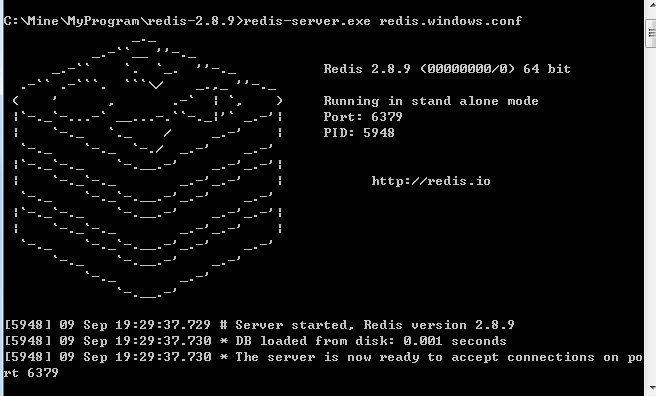
首先启动redis
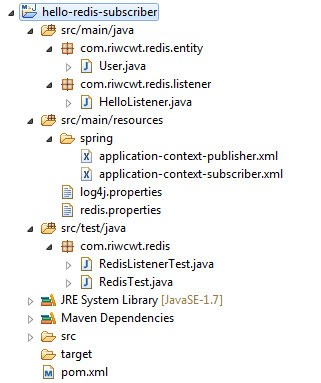
测试demo中,发布和订阅的功能都放在了一个工程中,工程使用maven,如下:
redis配置文件redis.properties
redis.host=localhost
redis.port=6379
redis.pass=

redis.maxTotal=512
redis.maxWaitMillis=30
redis.maxIdle=300
redis.testOnBorrow=true
工程pom.xml文件如下
<project xmlns="http://maven.apache.org/POM/4.0.0" xmlns:xsi="http://www.w3.org/2001/XMLSchema-instance"
	xsi:schemaLocation="http://maven.apache.org/POM/4.0.0 http://maven.apache.org/maven-v4_0_0.xsd">

	<modelVersion>4.0.0</modelVersion>
	<groupId>com.riwcwt</groupId>
	<artifactId>hello-redis-subscriber</artifactId>
	<packaging>jar</packaging>
	<version>1.0-SNAPSHOT</version>
	<name>hello-redis-subscriber</name>
	<url>http://maven.apache.org</url>

	<dependencies>
		<dependency>
			<groupId>junit</groupId>
			<artifactId>junit</artifactId>
			<version>4.11</version>
			<scope>test</scope>
		</dependency>
		<dependency>
			<groupId>redis.clients</groupId>
			<artifactId>jedis</artifactId>
			<version>2.5.2</version>
		</dependency>
		<dependency>
			<groupId>org.springframework.data</groupId>
			<artifactId>spring-data-redis</artifactId>
			<version>1.3.4.RELEASE</version>
		</dependency>
		<dependency>
			<groupId>org.springframework</groupId>
			<artifactId>spring-test</artifactId>
			<version>3.2.10.RELEASE</version>
		</dependency>
		<dependency>
			<groupId>commons-logging</groupId>
			<artifactId>commons-logging</artifactId>
			<version>1.2</version>
		</dependency>
	</dependencies>
</project>
发布
application-context-publisher.xml配置文件如下:
<?xml version="1.0" encoding="UTF-8" standalone="no"?>
<beans xmlns="http://www.springframework.org/schema/beans"
	xmlns:aop="http://www.springframework.org/schema/aop" xmlns:context="http://www.springframework.org/schema/context"
	xmlns:jdbc="http://www.springframework.org/schema/jdbc" xmlns:jee="http://www.springframework.org/schema/jee"
	xmlns:tx="http://www.springframework.org/schema/tx" xmlns:jpa="http://www.springframework.org/schema/data/jpa"
	xmlns:xsi="http://www.w3.org/2001/XMLSchema-instance" xmlns:security="http://www.springframework.org/schema/security"
	xmlns:redis="http://www.springframework.org/schema/redis"
	xsi:schemaLocation="
	http://www.springframework.org/schema/aop
	http://www.springframework.org/schema/aop/spring-aop.xsd
	http://www.springframework.org/schema/beans
	http://www.springframework.org/schema/beans/spring-beans.xsd
	http://www.springframework.org/schema/context
	http://www.springframework.org/schema/context/spring-context.xsd
	http://www.springframework.org/schema/jee
	http://www.springframework.org/schema/jee/spring-jee.xsd
	http://www.springframework.org/schema/tx
	http://www.springframework.org/schema/tx/spring-tx.xsd
	http://www.springframework.org/schema/jdbc
	http://www.springframework.org/schema/jdbc/spring-jdbc.xsd
	http://www.springframework.org/schema/data/jpa
	http://www.springframework.org/schema/data/jpa/spring-jpa.xsd
	http://www.springframework.org/schema/security
	http://www.springframework.org/schema/security/spring-security.xsd
	http://www.springframework.org/schema/redis
	http://www.springframework.org/schema/redis/spring-redis.xsd">

	<context:property-placeholder location="classpath*:redis.properties" />

	<!-- redis连接池配置项 -->
	<bean id="poolConfig" class="redis.clients.jedis.JedisPoolConfig">
		<property name="maxTotal" value="${redis.maxTotal}" />
		<property name="maxIdle" value="${redis.maxIdle}" />
		<property name="maxWaitMillis" value="${redis.maxWaitMillis}" />
		<property name="testOnBorrow" value="${redis.testOnBorrow}" />
	</bean>

	<bean id="connectionFactory"
		class="org.springframework.data.redis.connection.jedis.JedisConnectionFactory">
		<property name="hostName" value="${redis.host}" />
		<property name="port" value="${redis.port}" />
		<property name="poolConfig" ref="poolConfig" />
	</bean>

	<bean class="org.springframework.data.redis.core.RedisTemplate">
		<property name="connectionFactory" ref="connectionFactory" />
	</bean>

</beans>
发布的测试:
package com.riwcwt.redis;

import java.io.Serializable;

import org.junit.Test;
import org.junit.runner.RunWith;
import org.springframework.beans.factory.annotation.Autowired;
import org.springframework.data.redis.core.RedisTemplate;
import org.springframework.test.context.ContextConfiguration;
import org.springframework.test.context.junit4.SpringJUnit4ClassRunner;

import com.riwcwt.redis.entity.User;

@RunWith(SpringJUnit4ClassRunner.class)
@ContextConfiguration("/spring/application-context-publisher.xml")
public class RedisTest
{

	@Autowired
	private RedisTemplate<Serializable, Serializable> redisTemplate = null;

	@Test
	public void test() throws InterruptedException
	{
		while (true)
		{
			// 每隔一秒钟,发布一条订阅
			Thread.sleep(1000);

			User user = new User();
			user.setUsername("账号");
			user.setPassword("密码");
			this.redisTemplate.convertAndSend("redis", user);
		}
	}

}
订阅
application-context-subscriber.xml配置文件:
<?xml version="1.0" encoding="UTF-8" standalone="no"?>
<beans xmlns="http://www.springframework.org/schema/beans"
	xmlns:aop="http://www.springframework.org/schema/aop" xmlns:context="http://www.springframework.org/schema/context"
	xmlns:jdbc="http://www.springframework.org/schema/jdbc" xmlns:jee="http://www.springframework.org/schema/jee"
	xmlns:tx="http://www.springframework.org/schema/tx" xmlns:jpa="http://www.springframework.org/schema/data/jpa"
	xmlns:xsi="http://www.w3.org/2001/XMLSchema-instance" xmlns:security="http://www.springframework.org/schema/security"
	xmlns:redis="http://www.springframework.org/schema/redis"
	xsi:schemaLocation="
	http://www.springframework.org/schema/aop
	http://www.springframework.org/schema/aop/spring-aop.xsd
	http://www.springframework.org/schema/beans
	http://www.springframework.org/schema/beans/spring-beans.xsd
	http://www.springframework.org/schema/context
	http://www.springframework.org/schema/context/spring-context.xsd
	http://www.springframework.org/schema/jee
	http://www.springframework.org/schema/jee/spring-jee.xsd
	http://www.springframework.org/schema/tx
	http://www.springframework.org/schema/tx/spring-tx.xsd
	http://www.springframework.org/schema/jdbc
	http://www.springframework.org/schema/jdbc/spring-jdbc.xsd
	http://www.springframework.org/schema/data/jpa
	http://www.springframework.org/schema/data/jpa/spring-jpa.xsd
	http://www.springframework.org/schema/security
	http://www.springframework.org/schema/security/spring-security.xsd
	http://www.springframework.org/schema/redis
	http://www.springframework.org/schema/redis/spring-redis.xsd">

	<context:property-placeholder location="classpath*:redis.properties" />

	<!-- 设置使用注解的类所在的jar包 -->
	<context:component-scan base-package="com.riwcwt.redis.listener"></context:component-scan>

	<!-- redis连接池配置项 -->
	<bean id="poolConfig" class="redis.clients.jedis.JedisPoolConfig">
		<property name="maxTotal" value="${redis.maxTotal}" />
		<property name="maxIdle" value="${redis.maxIdle}" />
		<property name="maxWaitMillis" value="${redis.maxWaitMillis}" />
		<property name="testOnBorrow" value="${redis.testOnBorrow}" />
	</bean>

	<bean id="connectionFactory"
		class="org.springframework.data.redis.connection.jedis.JedisConnectionFactory">
		<property name="hostName" value="${redis.host}" />
		<property name="port" value="${redis.port}" />
		<property name="poolConfig" ref="poolConfig" />
	</bean>

	<bean id="serialization"
		class="org.springframework.data.redis.serializer.JdkSerializationRedisSerializer" />

	<redis:listener-container connection-factory="connectionFactory">
		<!-- the method attribute can be skipped as the default method name is
			"handleMessage" -->
		<redis:listener ref="listener" method="onMessage"
			serializer="serialization" topic="redis" />
	</redis:listener-container>

</beans>
监听器的java代码
package com.riwcwt.redis.listener;

import javax.annotation.Resource;

import org.springframework.data.redis.connection.Message;
import org.springframework.data.redis.connection.MessageListener;
import org.springframework.data.redis.serializer.JdkSerializationRedisSerializer;
import org.springframework.stereotype.Service;

import com.riwcwt.redis.entity.User;

@Service(value = "listener")
public class HelloListener implements MessageListener
{

	@Resource(name = "serialization")
	private JdkSerializationRedisSerializer serialization = null;

	@Override
	public void onMessage(Message message, byte[] pattern)
	{
		User user = (User) serialization.deserialize(message.getBody());
		System.out.println(user.getUsername());
		System.out.println(user.getPassword());
		System.out.println(user.toString());
	}

}
订阅的测试代码:
package com.riwcwt.redis;

import org.junit.Test;
import org.junit.runner.RunWith;
import org.springframework.test.context.ContextConfiguration;
import org.springframework.test.context.junit4.SpringJUnit4ClassRunner;

@RunWith(SpringJUnit4ClassRunner.class)
@ContextConfiguration("/spring/application-context-subscriber.xml")
public class RedisListenerTest
{
	@Test
	public void test() throws InterruptedException
	{
		// 只是为了保持监听程序不退出
		while (true)
		{
			Thread.sleep(1000);
		}
	}

}
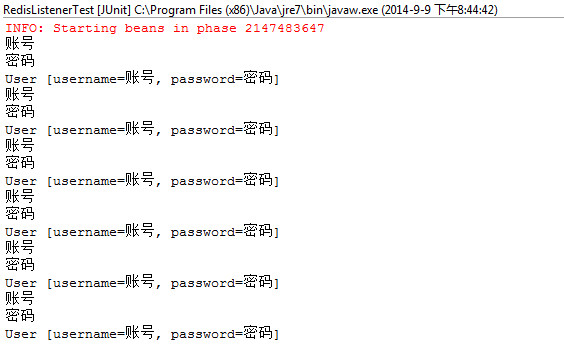
运行结果:
redis做发布和订阅功能,还只是在尝试,但是已经感觉到用起来相当方便,希望后续能用起来,看看运行效果。